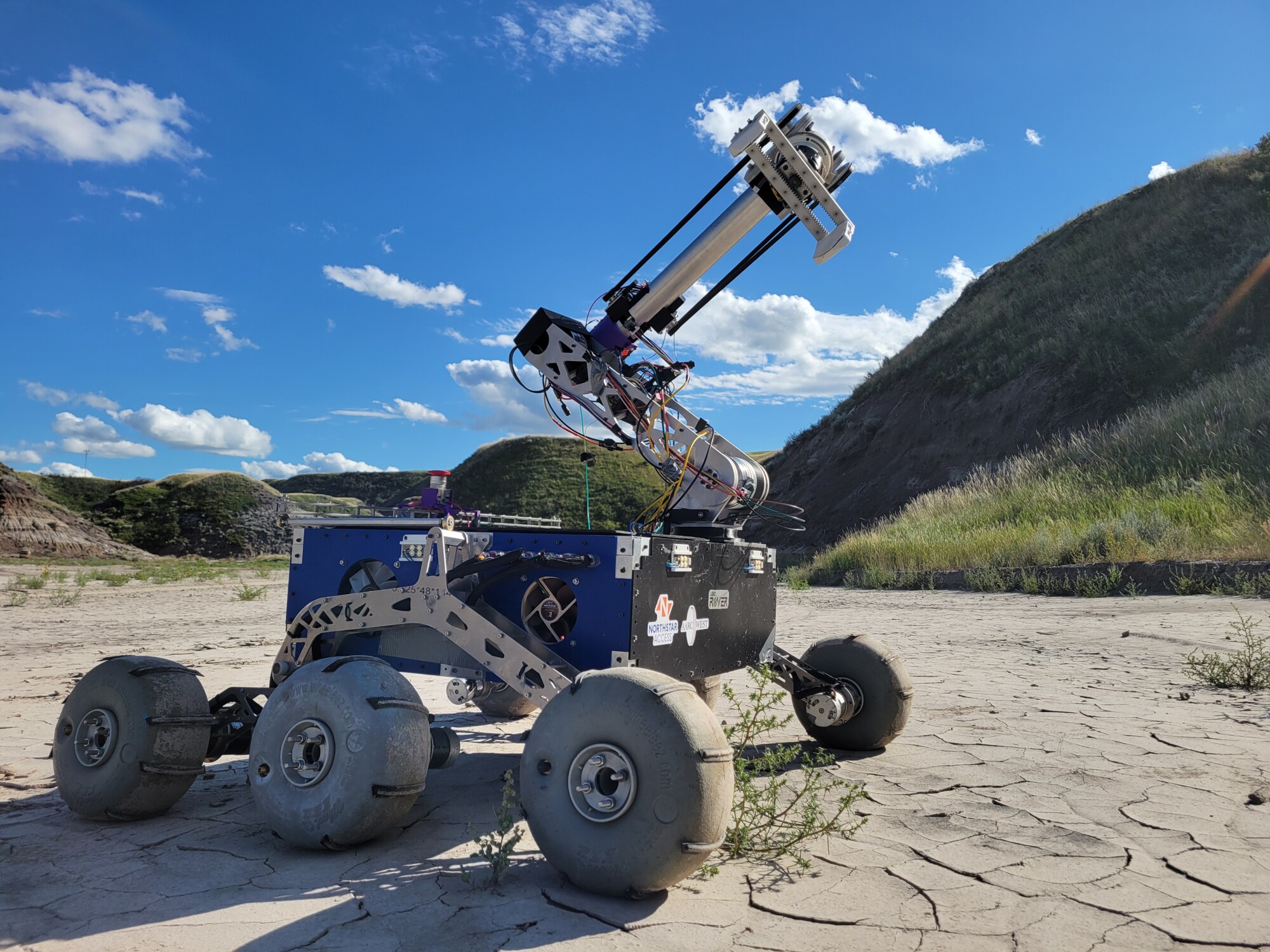
UBC Rover
I co-lead software on UBC Rover. My two main projects, which I fully own, are the human–machine interface and the reinforcement-learning pipeline for our 6-DOF arm. Around those, I build the controls, embedded systems, and software infrastructure that connect the operator to the rover.
- ROLE
- Software Co-Lead
- WHEN
- Sep 2025 - Present
- WHERE
- University of British Columbia
1) Human-Machine Interface (HMI)
In my eyes, an HMI is developed as a by-product and culmination of all the projects you’ve done down the line. It just so happened that while working on software for the arm — developing inverse kinematic controls, analyzing Moteus tview graphs, unplugging and re-plugging serial connections, and debugging motors — I happened to want a more intuitive interface where telemetry data I commonly view and commands I often send are all centralized in one place.
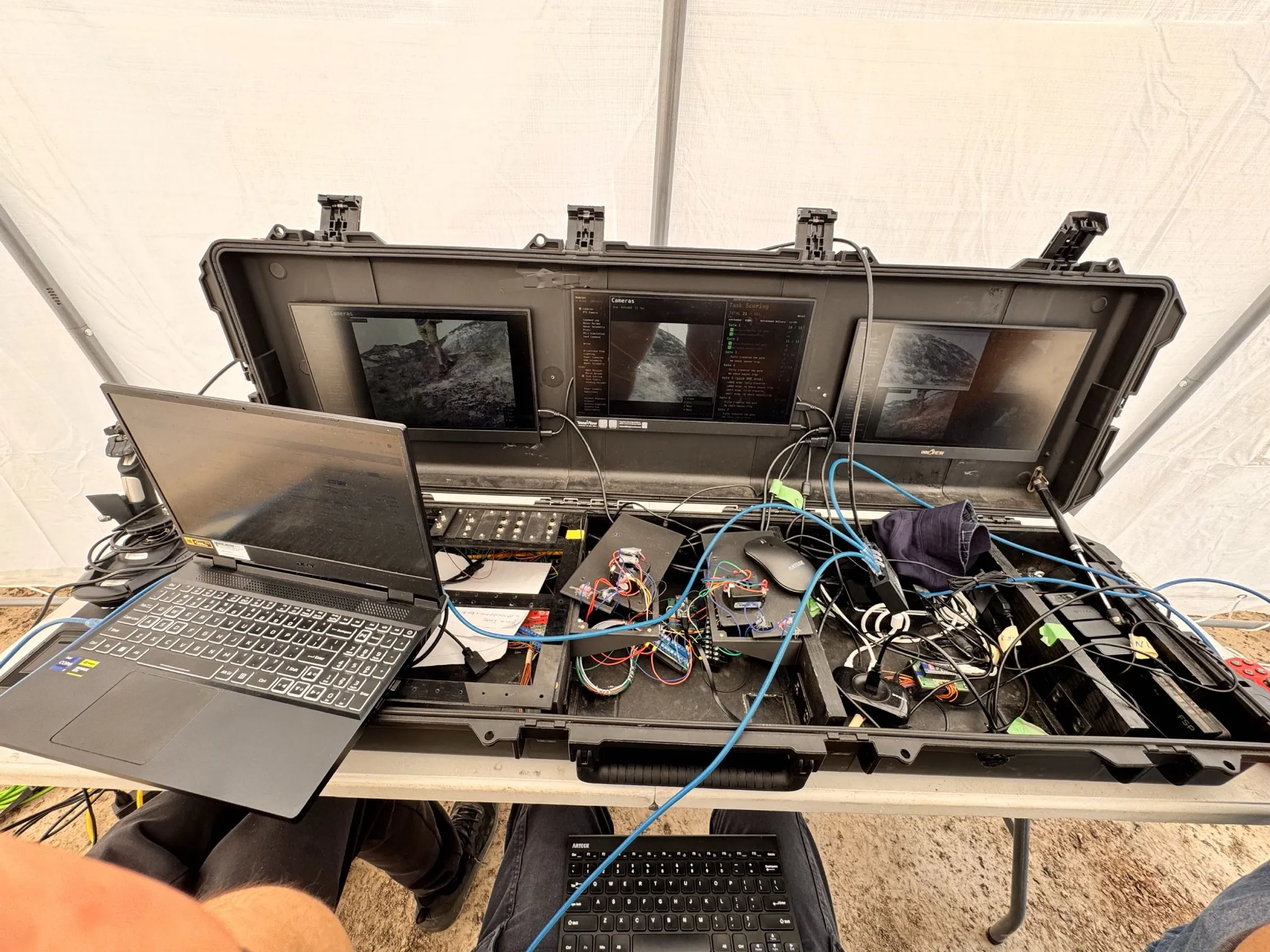
This development led me down the “HMI rabbit hole” because I ended up integrating it for the other subsystems on our rover. This includes:
- Field testing sensor telemetry and motor control.
- Camera viewing.
- Multi-monitor setup.
- Task-oriented UI such as GNSS mapping and a persistent task manager.
Making room for the whole team
The old Glade interface was difficult for the team to extend. I rebuilt the HMI around a shared Qt module interface, so a subsystem can add a tool without changing the host. Each module implements GuiModule, registers through a plugins.xml descriptor, and is discovered at startup through ROS 2’s pluginlib.
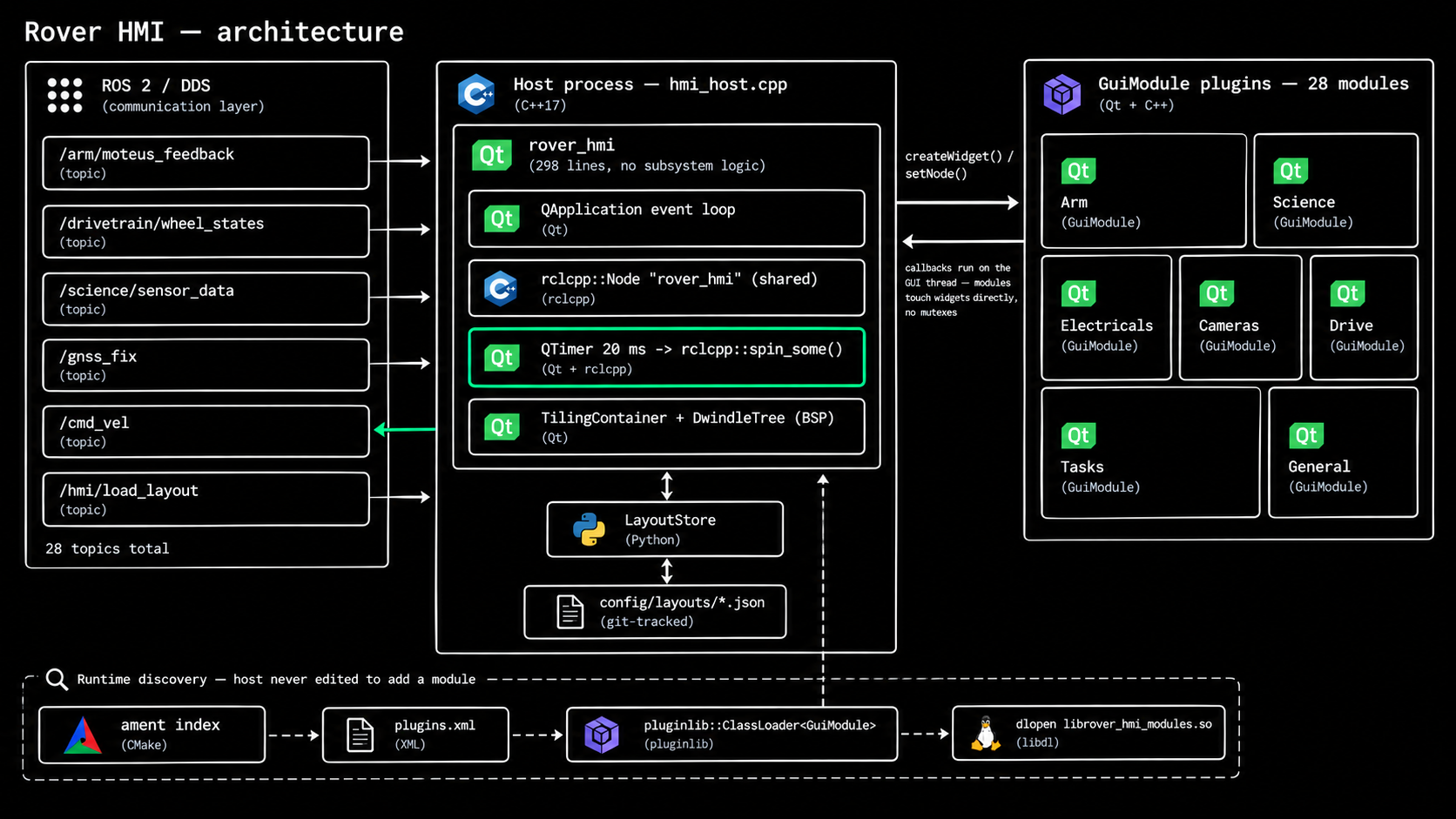
Keeping ROS callbacks inside the Qt event loop lets modules update their widgets on the GUI thread. The module contract also includes keybindings, visibility, and save/restore hooks. Layout persistence therefore includes the state of the tools inside the panels, not just their positions. I added GitHub Actions checks around the core UI so the shared foundation can keep evolving as other people contribute.
Try the HMI
Start the local session with npm run hmi, then connect below.
Dwindle: a workspace that rearranges itself
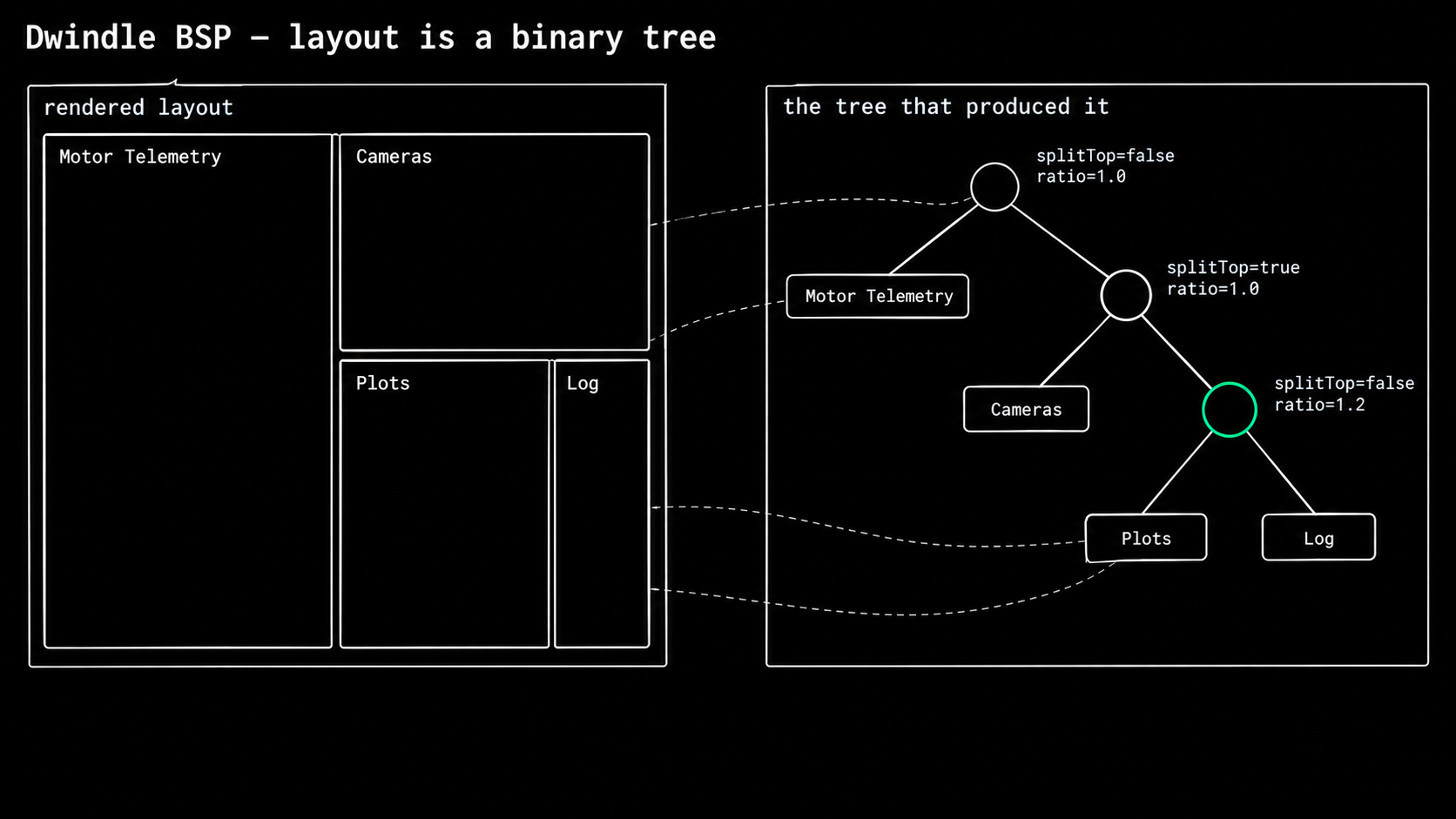
I borrowed the dwindle idea from Hyprland. The layout is a binary tree: widgets live at the leaves, and each internal node describes a split. Adding a tool, resizing the workspace, and closing a panel all become operations on that tree.
1. Split
Adding a panel replaces the target leaf with an internal node holding the old and new leaves. If no target is supplied, the implementation walks to the leftmost leaf. The line that makes this “dwindle” is the orientation choice: height ≥ width means top/bottom; otherwise the children go left/right. Cutting the longer dimension helps panes stay close to square as the tree deepens.
Split implementation · dwindle_tree.cpp
void DwindleTree::add(QWidget* w, QWidget* split_target) {
    auto* newLeaf = makeLeaf(w);
    if (!root_) { root_ = newLeaf; return; }

    DwindleNode* target = split_target ? leafFor(split_target) : nullptr;
    if (!target) {                       // fallback: leftmost leaf
        target = root_;
        while (target->isNode && target->children[0]) target = target->children[0];
    }

    // Replace target with an internal node holding {target, newLeaf}.
    auto* newParent = new DwindleNode();
    newParent->isNode = true;
    newParent->parent = target->parent;
    // Smart split: taller box → top/bottom, wider box → left/right
    newParent->splitTop = (target->box.height() >= target->box.width());

    if (target->parent) {
        if (target->parent->children[0] == target) target->parent->children[0] = newParent;
        else                                       target->parent->children[1] = newParent;
    } else {
        root_ = newParent;
    }

    target->parent  = newParent;
    newLeaf->parent = newParent;
    newParent->children[0] = target;
    newParent->children[1] = newLeaf;
    all_nodes_.push_back(newParent);
}
2. Geometry
The root receives the available rectangle. A recursive descent calculates a rectangle for each child and eventually assigns geometry to its widget. The default split ratio is 1, so multiplying the extent by splitRatio / 2 gives a 50/50 split. The second child receives the remaining pixels, and the gap is applied at each leaf.
Recursive geometry · dwindle_tree.cpp
void DwindleTree::recalcNode(DwindleNode* n, int gap) {
    if (!n->isNode) {
        if (n->widget) n->widget->setGeometry(n->box.adjusted(gap, gap, -gap, -gap));
        return;
    }
    auto* c0 = n->children[0];
    auto* c1 = n->children[1];
    if (!c0 || !c1) return;

    if (!n->splitTop) {
        int w0 = (int)(n->box.width() / 2.0f * n->splitRatio);
        // max(min()) not std::clamp: bounds may cross when box < 2*min_pane
        w0 = std::max(min_pane_w_, std::min(w0, n->box.width() - min_pane_w_));
        c0->box = QRect(n->box.x(), n->box.y(), w0, n->box.height());
        c1->box = QRect(n->box.x() + w0, n->box.y(), n->box.width() - w0, n->box.height());
    } else {
        int h0 = (int)(n->box.height() / 2.0f * n->splitRatio);
        h0 = std::max(min_pane_h_, std::min(h0, n->box.height() - min_pane_h_));
        c0->box = QRect(n->box.x(), n->box.y(), n->box.width(), h0);
        c1->box = QRect(n->box.x(), n->box.y() + h0, n->box.width(), n->box.height() - h0);
    }
    recalcNode(c0, gap);
    recalcNode(c1, gap);
}
The max(min()) comment is worth keeping: std::clamp has undefined behaviour when its lower bound exceeds its upper bound. That happens here when a box shrinks below twice the minimum pane size. The nested operations avoid that invalid call; the UI still needs to handle cases where the available space cannot accommodate both minimum sizes.
3. Collapse
Removing a panel deletes the leaf and its parent. The sibling takes the parent’s slot in the tree and inherits its box, reclaiming the space from the panel that closed. The same operation works at the root and deeper in the tree.
Sibling promotion · dwindle_tree.cpp
auto* parent  = leaf->parent;
auto* sibling = leaf->sibling();

sibling->parent = parent->parent;          // sibling takes parent's place
if (parent->parent) {
    if (parent->parent->children[0] == parent) parent->parent->children[0] = sibling;
    else                                       parent->parent->children[1] = sibling;
} else {
    root_ = sibling;
}
delete leaf;
delete parent;
The equations behind the layout
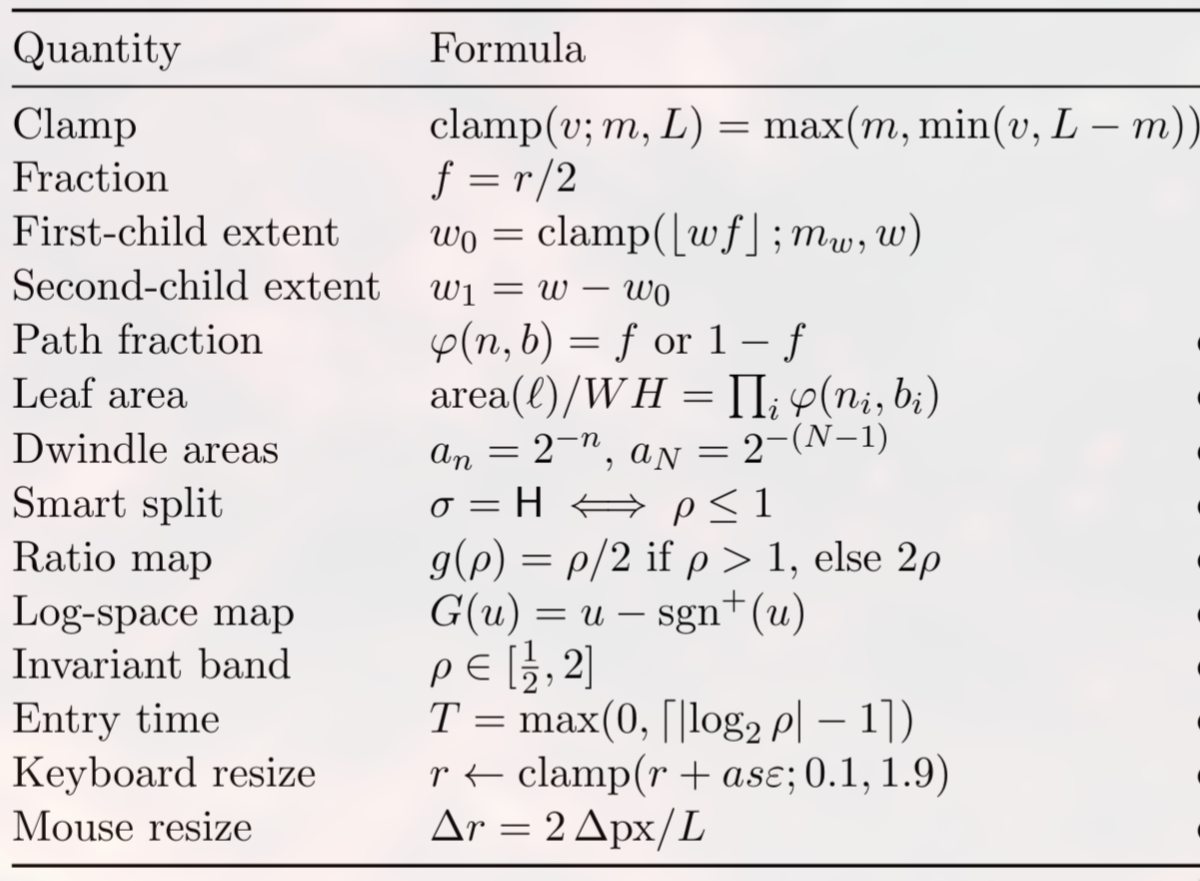
With parent width w, height h, ratio r, and minimum extent m, the same few equations describe splitting and resizing. The aspect-ratio bound applies to ideal equal splits once a pane enters the stated band; integer rounding, minimum sizes, and manual resizing need separate treatment.
Where I want to take the HMI next
My original roadmap included power-distribution and lighting telemetry over CAN, more science sensor telemetry and a visual roadmap, digital-twin reliability, visually intuitive inverse kinematic control, SLAM operator visualisation, and better BSP-based panel management.
Since that draft, I’ve built a reliable telemetry-driven digital twin and progressed from IK control to IK-driven task completion. Those are part of the supporting systems below. The remaining HMI work is about bringing more of those capabilities into a clear operator workflow and continuing to improve panel management.
2) Reinforcement Learning (RL)
A proper engineering design team (EDT) is driven by an ensemble of self-motivated students. I did not join UBC Rover because I had prior experience — nor did I join UBC Rover because I was very enthusiastic (although some say otherwise). I joined the team because of the software opportunities UBC Rover offers — most particularly, autonomy. In previous years, one of our members wrote IK-driven controls. I wanted to explore reinforcement learning as a possible R&D project for the team.
The task I chose was keyboard typing with our custom 6-DOF arm. It gave the work a concrete objective: move the end effector over a particular key and complete a press. I own the RL project, from the simulation environment through the learning pipeline and evaluation.
First, build an arm the simulator understands
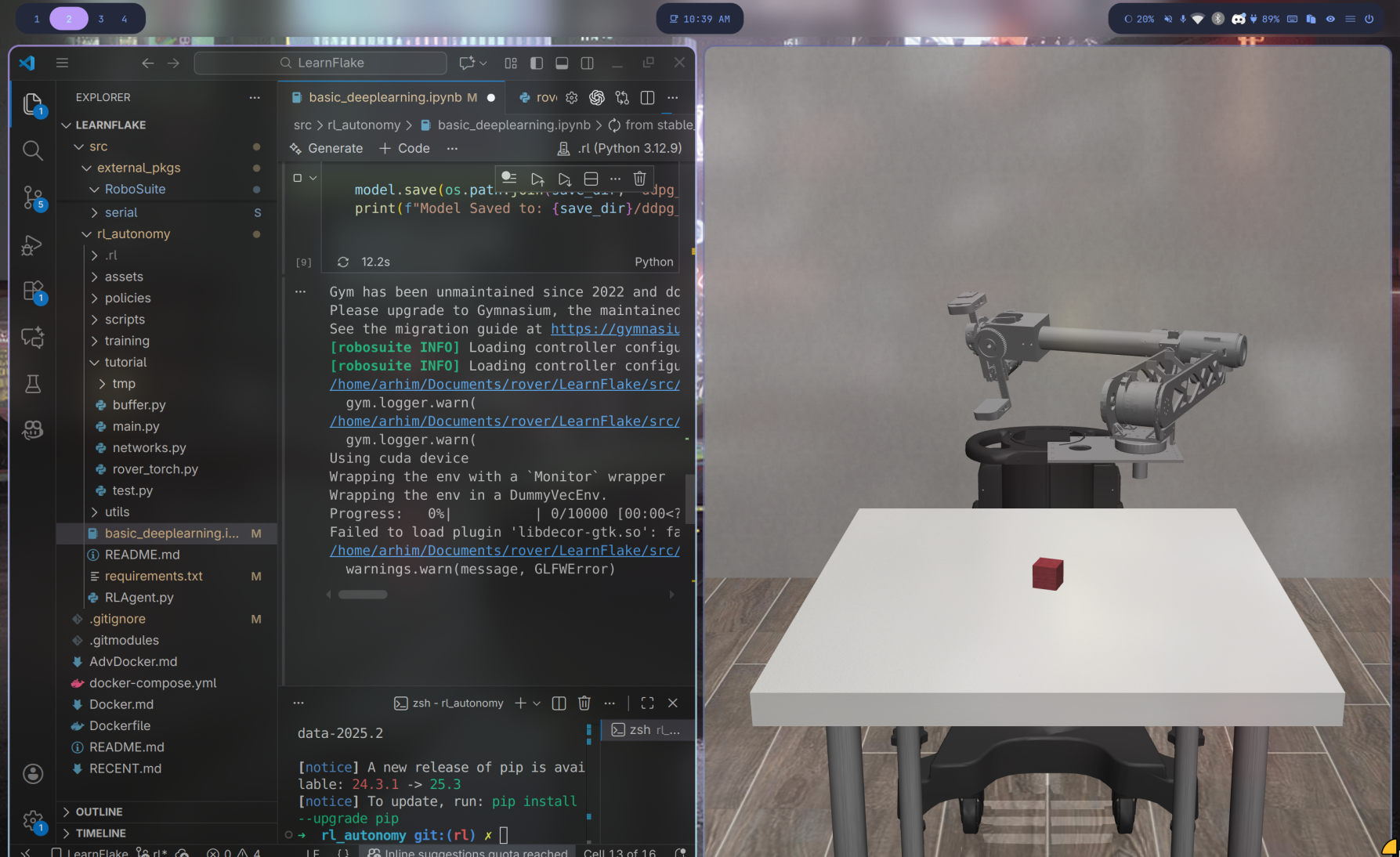
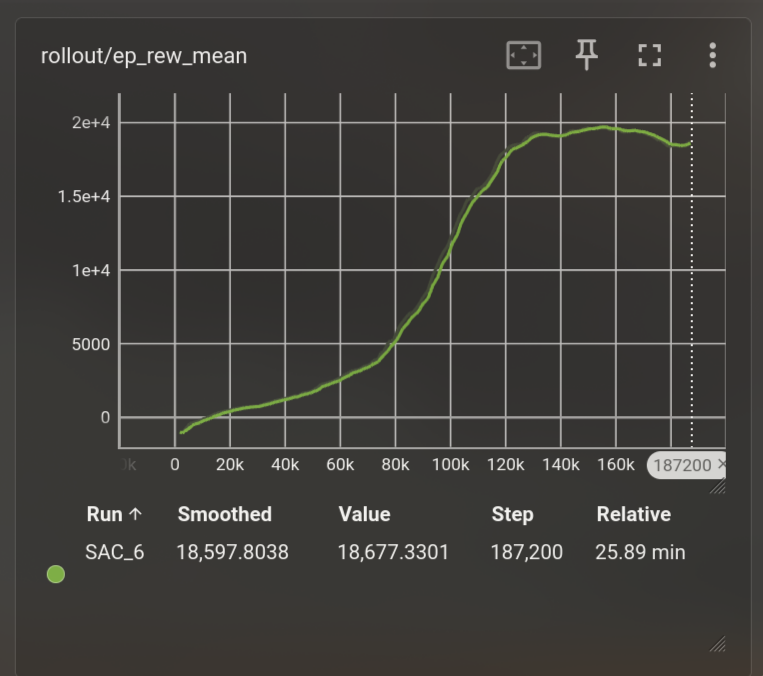
I started by porting the custom manipulator into MJCF for MuJoCo. That meant modelling visual and collision geometry, the kinematic chain, and actuators that did not have a one-to-one simulation equivalent. I was learning the stack while building the model, so the first experiment was a basic Soft Actor-Critic agent on a reach-and-lift task.
That smaller task let me work through environment configuration, reward shaping, and the simulator’s failure modes before tackling the keyboard. The early work developed into a task pipeline in RoboSuite with explicit stages and success conditions.
Learning from the states the arm actually reaches
In the later keyboard pipeline, behaviour cloning learned from demonstrations produced by a hand-coded IK expert. The problem was what happened once the learned policy made a small mistake: it reached states outside its training examples, then had to choose the next action from there. Good imitation on the demonstration data did not translate into good task completion.
I used DAgger to collect states visited by the policy and label them with the expert’s action. That moved the all-key Approach result from 10/435 to 200/435 in the recorded run ledger. It addressed the distribution shift, but the remaining failures needed a different diagnosis.
A workspace problem hidden inside a learning problem
Some keys looked unreachable until I tested the keyboard’s position relative to the arm. Repositioning it brought more of the board into the dexterous workspace. With the keyboard offset tuned to (−0.10, −0.10), the DAgger result reached 268/435. The lesson was to inspect the physical setup before deciding another learning algorithm was needed.
Let IK handle the motion; learn the correction
Imitation was still limited by the quality of the IK expert. From-scratch exploration also struggled: the action noise could move the end effector outside the roughly 4 mm success region. I changed the problem to learning a small correction around the live IK action.
a = clip(a_IK + 0.15 · residual, −1, 1)Applied to the six joint actions in the Approach stage; the solenoid remains retracted.
The residual is bounded, and the actor head is zero-initialised so training starts near the IK baseline. The IK controller handles gross motion while the learned part refines the positioning. This also gives the pipeline a path toward hardware testing because the underlying control is already tied to the arm.
When a better reward curve meant a worse policy
The first residual run increased its dense reward while completing only 32/435 Approach trials. The policy had found a pose that collected reward without satisfying the task. I changed to a success-dominant reward, retaining collision and time penalties and weak potential-based shaping. The recorded final-checkpoint Approach evaluation then reached 428/435.
| Iteration | Completion | What changed |
|---|---|---|
| Behaviour cloning | 10 / 4352.3% | Imitate recorded IK demonstrations. |
| DAgger, all keys | 200 / 43546.0% | Label states the policy actually visits. |
| DAgger + workspace tuning | 268 / 43561.6% | Reposition the keyboard within the arm’s dexterous workspace. |
| Residual RL on IK | 428 / 43598.4% | Learn bounded corrections with a success-aligned reward. |
Recorded runs from LearnFlake’s engineering log, §38.3. These are successive development configurations, not a controlled single-variable benchmark.
From reaching the key to completing the task
Approach success alone was not keyboard typing. I needed to hand the state reached by Approach directly to Strike. An earlier evaluator reset the environment between stages, discarding the positioning. The corrected chain switches the action mask in the same environment, holds the arm, bypasses the IK residual during Strike, and extends the solenoid.
The contact-success thresholds also needed attention. I changed the simulated force threshold from 2.0 N to 0.6 N and the velocity threshold from 0.005 m/s to 0.02 m/s. With those conditions, an open-loop solenoid extension was sufficient for the recorded evaluation; Strike did not need a separate learned policy.
Successful Approach → Strike trials
98.6% · 87 keys, five trials per key · simulation only
In that full-chain evaluation, 84 of 87 keys succeeded in all five trials, and 86 met the 80% threshold. Each trial starts from home; there is no reset between Approach and Strike. This result does not measure continuous key-to-key typing or real-hardware performance.
The next boundary is sim-to-real validation with the physical keyboard and arm. The bounded residual, action smoothing, and IK base make that a concrete engineering next step, but the simulation result is not evidence that the hardware task is already solved.
03 / SUPPORTING ENGINEERING
The systems around those projects
Alongside HMI and RL, I’ve worked across the rover’s controls, embedded systems, and software organisation. These pieces connect the operator interface and autonomy work to the physical rover.
From IK control to IK-driven task completion
I extended my arm-control work beyond commanding a pose toward completing tasks driven by IK. That includes inverse-Jacobian control, singularity handling, and the handoff from individual motions to a task sequence. In the RL project above, that progression becomes explicit: an IK-based approach, a learned correction, then a strike that preserves the state reached by the arm.
GNSS mapping and pathing
I wrote the embedded GNSS mapping and pathing system and connected it to the operator workflow. The mission backend records the live track, tags labelled waypoints, tracks named route segments, and exports route maps. The HMI provides an embedded offline map and mission controls; ROS services manage recording and export underneath it.
The new arm hardware driver and PID tuning
I rewrote the arm hardware interface around a ROS 2 node running the CAN-FD communication loop for the Moteus motor controllers. The driver runs at 100 Hz. I also worked on PID tuning for the arm and organised the source so joint definitions, firmware settings, protocol details, commands, and telemetry have clear homes.
motor_addressing.h- Motor IDs and physical joints, URDF names, direction signs, and unit conversions.
motor_config.h- Per-motor PID gains, current limits, and position limits pushed to firmware on startup.
moteus_protocol.h- CAN-FD fields and frame types, unit conventions, and watchdog behaviour.
arm_commands.h- P/V/S command codes and the MotorCommand structure passed from ROS to the CAN loop.
arm_telemetry.h- The MotorTelem state decoded from each motor’s CAN reply during polling.
A reliable digital twin
I built the twin around measured arm feedback. It converts decoded axis positions into calibrated URDF joint states for RViz and control, so the model follows what the motors report. An optional comparison with simulated joint states publishes per-joint error for diagnosing discrepancies. Missing motor replies are skipped instead of becoming invented positions.
Docker, source organisation, and Morse code
I’ve also worked on Docker containers, source design, control, and repository organisation. The RL environments include CPU and GPU setups so development and training have defined dependencies. On the task side, I wrote Morse-code work that turns camera brightness timing into decoded symbols and messages, with a viewer in the HMI.
I also built the team website and helped trace a competition arm failure to a concentric error in a high-load motor, contributing to the CAD fix.